Design, code and AI, in one workflow
I run some of my recent projects with AI agents. I frame, pilot and rough out the design. Then the agents build the project and write the code, through successive iterations, and I review and polish it. Here are five steps of my workflow, shown on three different projects, to illustrate the tools I used and the frictions I fixed along the way.
My favorite environments
- Figma
- Claude Code
- Claude
- Claude Design
- Notion
- GitHub
- Vercel
- Next.js
- Astro
- Tailwind CSS
- Gemini
- Datadog
- Umami



Framing Tenon mobile game this portfolio Health journal
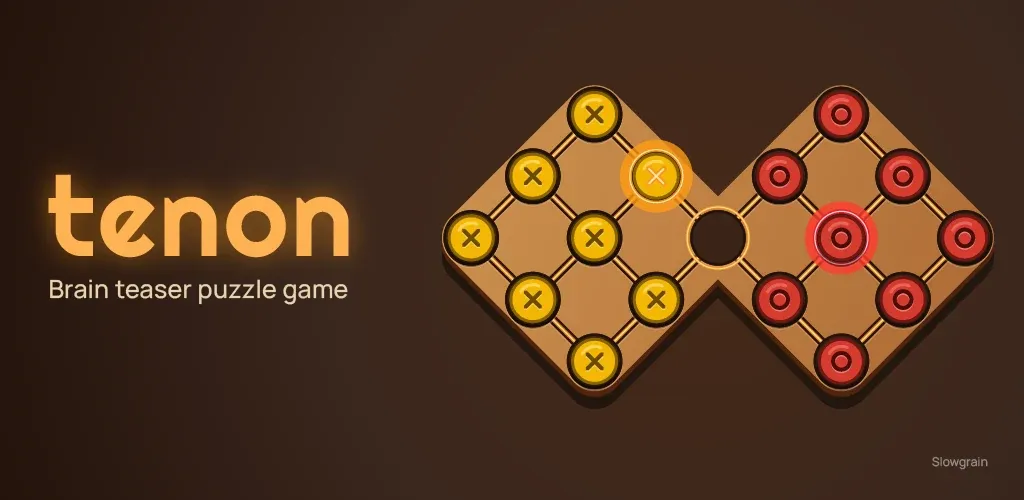
A mobile game on the Play Store, adapted from a wooden puzzle.
Tenon is a mobile game adapted from a wooden puzzle: you swap the positions of pegs of different colors. It has been on the Play Store in early access since November 10, 2026. My goal: learn to design and publish a simple mobile game, working with AI agents.
My portfolio. Third version, the first built with AI agents. Bilingual, EN and FR.
My portfolio is on its third version: the first coded by hand (HTML, CSS, a little JavaScript), the second designed in Figma and coded with Gemini 2.5 Pro, and this one built with Claude Code. It exists in French and English. Its goal: to showcase my UX design projects and my ways of working.
A calm-UX web app to track meals and body signals, with no judgement and no anxiety-inducing diagnosis.
Health journal is a platform for tracking food and emotional state. It is aimed especially at people living with an eating disorder or chronic digestive conditions, and at anyone who wants to understand their body's signals better. It started as a personal tool that notably helped my doctor diagnose my IBS.
Before any code or design, I decide what the project is, who it is for and where it stops. Then I turn that into a rulebook and skills that every agent session starts from.
- Visual direction is one of the game's main criteria. I aimed for a calm, wooden mood with light sound effects and soft music, plus a discreet layer of technology so the screen doesn't feel static.
- After researching the technical tooling, I chose Godot, driven with Claude Code. The design system will be useful when I develop the next levels.
- My backlog is synchronized between Claude, GitHub and Notion. Agents maintain it automatically and I can still edit it by hand, as in an agile setup where each agent has its own tasks and tickets.
- No marketing planned: it's a learning project with no financial cost. A light monetization is planned for the next release.
Tools
- Claude Code
- OpenCode
- Claude
- Godot
- Notion
- GitHub
- Claude Design
- Gemini
- Google Play Console


Correction
Agents in different environments need the same source of truth. One synced backlog keeps them aligned when my decisions change.
- I wanted a static site that I can edit without effort. No CMS, no online portfolio builder: I keep control of everything. Text, images and projects live in YAML files that Astro templates read. To add or hide a project, I simply edit a text file. Stack: Astro 5 with static output, Tailwind CSS 3, and GitHub Pages for deployment.
- I set the agent's rules and constraints in a rulebook of about 120 lines, trimmed from 4.3k to 1.6k tokens in the latest refactoring.
Tools
- Claude Code
- OpenCode
- Claude
- GitHub
- Astro
- Tailwind CSS
- Figma
- Claude Design
- Gemini
- GitHub Pages
- Umami
- Google Search Console


- Most tracking apps chase performance or looks, which can be a problem for individuals. Everyone should keep control of their goals and personal data. Data entered by hand is hard to use effectively. Between two consultations, supporting patients can also be difficult.
Researching Tenon mobile game this portfolio Health journal
I research until I can write constraints that the design and the agents must respect. The result is a written constraints document, not a pile of references.
- Competitive review of the Play Store and the App Store. I compared the available environments and the AI-compatible tools for building a mobile game.
- Playing the physical puzzle showed me that the rules are simple but hard to guess. Like chess: you see the squares, not the legal moves. The game has to teach them. A physical puzzle is handled in three dimensions, while a fixed screen flattens the experience and shortens how long people stay with it. The game needs elements that keep players engaged longer.
- I ran a benchmark of senior portfolios and kept watch on what French and American tech companies expect.
- I tested my Figma mockups with 7 different people, on mobile, desktop and tablet. Professionals from different sectors (design, ergonomics, etc.) reviewed the wording and copy to check that the text was understandable. The conclusion: lean more on my methodology and technique than on the final visual result.
- We defined four areas of study: the qualitative and quantitative views of health professionals, then those of individuals. We drew on a substantial body of documentation: a review of the scientific literature on chronic eating and digestive disorders, a guide to good vocabulary practice for vulnerable audiences, and a study of existing apps.
- We contacted health professionals (dietetics, gastroenterology, psychology) and people affected, to test our vision against the reality on the ground.
This project is in progress
The details of this project are not public yet. We are currently discussing partnerships and conducting user testing. If you are interested or wish to contribute:
Get in touchDesigning Tenon mobile game this portfolio Health journal
Wireframes come first and fix the structure and states of each screen. The design system lives in one place that the code reads, the design tokens, and is never hardcoded in components.
Onboarding and game features
- A rules sheet in the settings, and a visual aid showing legal moves that can be switched off.
- A three-step onboarding explains the goal and the three rules. It can be replayed from the settings, and it runs on a simulation board so it doesn't spoil the start of the solution.
- Reflective pause: you can move the pegs freely along two axes and throw them, with sound effects. It doesn't count as a move, and the peg returns on its own.
Wireframes
- Claude Design
- I listed the pages, their content and the features, then generated wireframes from that. From the wireframes I drew up the list of components for the UI kit.
Hi-fidelity UI design
- Gemini
Design system kit
- I gathered the Material Design 3 library, Android's design system, on GitHub so my agents can read it. For the visual direction, I started from royalty-free textures and reworked them with tokens that translate wood species into an interface language. I laid these textures over Material 3's native components: raw wood with a thin high-tech layer. The UI kit is tailored to Android, highly customized and consistent across the whole interface.
Tools
- Claude Design
- Claude Code
- Godot
Correction
Keeping the visual direction consistent across every interface component was hard. I built an interactive space to browse the UI kit, with a comment area handled by a dedicated AI agent. Thanks to the tokens and the validated constraints, the design system now grows without friction.
Wireframes
- Figma
Hi-fidelity UI design
- Figma
- Claude Code
- Claude Design
- Gemini
- I produced the wireframes and high-fidelity mockups in Figma, along with the design system, the UI kit and the tokens. The site is mobile first, but designed to be responsive for presentations on a laptop. Components are therefore built for every device (mobile, tablet, desktop).
Correction
At first, the screenshots of my mockups that I gave Gemini lost part of the visual information, because it had no API or MCP access to Figma. An export of my tokens as JSON made up for some of it, but gaps remained because of the lost context. I fixed them by moving to Claude Code, with the Figma MCP integration.
Design system kit
- The design tokens are Figma variables, in two collections: Primitive (123 variables) and Semantic (71). Semantic tokens point to primitives, and both feed the tokens file that the code reads.
tokens.js → tailwind.config.mjs → component
// 1. src/styles/tokens.js
const primitives = {
  color: {
    gray: { 300: "#d1d5dc" },
    "accent-action": { 400: "#7f98fa" },
  },
};

const semantic = {
  colors: {
    "stroke-primary": primitives.color["accent-action"][400],
    "stroke-neutral-primary": primitives.color.gray[300],
  },
};

// 2. tailwind.config.mjs
colors: {
  ...tokens.semantic.colors,
},

// 3. Footer.astro
<button class="border border-stroke-neutral-primary rounded-full">
Code excerpt of the exported design tokens, shown on purpose.
The details of this project are not public yet.Get in touch
Building Tenon mobile game this portfolio Health journal
I write the brief and the acceptance criteria, then review. I check every result in the product itself, not only in the code. When an agent gets something wrong, the lesson becomes a rule.
- Godot, driven mostly with Claude Code at first, then with DeepSeek and Gemini.
- One screen at a time, with stops and before and after captures. I validate on a real phone before moving to the next screen. I wrote no application code by hand. My technical work was auditing and checking.
Tools
- Claude Code
- OpenCode
- Godot
- DeepSeek
- Gemini
Correction
I had built two renders, 2D and 3D. The 3D one weighed down the rendering and testers saw no point in it, so I removed it and replaced it with free peg movement.
- My Claude Code agent reads the repository in real time and follows my constraint files, my context and my skills. A skill formats my project writing as YAML. The agent only structures the text, which stays editable by hand at any time.
Tools
- Claude Code
- OpenCode
- Claude
- Astro
- Tailwind CSS
The details of this project are not public yet.Get in touch
Testing and releasing Tenon mobile game this portfolio Health journal
Before pushing a change made by an agent to production, I test it on a secondary branch. I run a quality assurance review, the design QA, comparing the coded version with my design. I log each gap as a comment, through Vercel or GitHub, to turn them into backlog tasks.
Tests and accessibility
- Automated tests cover the game rules, layout, font sizes and touch targets. People close to me tested the game before release, to check that the rules were understood, the interface was easy to use and the visual style worked.
- Contrast is computed from the tokens: the exceptions I accepted are decided and documented. I ran captures through a color-blindness simulation. Pegs also differ by shape, shadow and an engraved symbol.
Release
- On the Play Store since November 10, 2026, in early access and open to everyone.
- The next release will include monetization through AdMob. It builds on the puzzle's retry loop, without pushing players or getting in the way of the game.
Tools
- Google Play Console
Correction
The first two exports had minor bugs that did not show in the Godot simulator. I now always test with exported APK files.
- GitHub lets me push the site to production on my own domain. Separate branches let me test before releasing to the main branch, which is tied to my domain. On the SEO side: canonical URLs, language alternates, Open Graph and structured data.
- After testing several analytics tools, I kept Umami: it is lighter and does not collect private data, so it suits a low-traffic portfolio better.
- Over six months (May to November 2026), 75% of visits arrive directly, probably through the UTM links in my résumés, and 17% through organic search. Since the site was translated into French in July 2026, France went from 6% to 20% of traffic. The United States stay around 50%.
Tools
- GitHub Pages
- Umami
- Google Search Console
Correction
The accessibility audit I ran with Claude Code let me improve contrast, skip links, keyboard navigation and reduced motion.
The details of this project are not public yet.Get in touch